Web Applications
Larvaworld provides browser-based applications for simulation setup, environment
configuration, experimental dataset import, dataset management, model inspection,
and trajectory visualization. The current browser entry point is the
Larvaworld Portal, launched with larvaworld-portal.
The portal is built with Panel and the HoloViz/Bokeh stack. It combines workspace-aware workflows, curated landing-page navigation, notebook launch shortcuts, and the established Larvaworld visualization dashboards in one served application.
Launching the Portal
larvaworld-portal
Access: http://localhost:5006
The default port can be overridden with:
LARVAWORLD_PORTAL_PORT=5010 larvaworld-portal
Browser opening can be controlled with:
LARVAWORLD_PORTAL_OPEN_BROWSER=false larvaworld-portal
Stop the server with Ctrl+C.
The legacy dashboard launcher remains available as:
larvaworld-app
Portal Structure
The portal serves multiple Panel applications from a single Bokeh process. The main entry point opens a loading and workspace setup screen, then redirects to the landing page.
Area |
App ID / Route |
Purpose |
|---|---|---|
Loading / Workspace Setup |
|
Initialize the portal and select or initialize a Larvaworld workspace |
Landing Page |
|
Browse workflows by user mode and application lane |
Notebook Launcher |
|
Open workflow-specific tutorial notebooks from the portal context |
Single Experiment |
|
Configure one Larvaworld experiment run in the browser |
Import Experimental Datasets |
|
Discover raw experimental datasets and import one dataset into workspace storage |
Dataset Manager |
|
Browse, inspect, copy paths, refresh, and remove imported workspace datasets |
Environment Builder |
|
Build arenas, borders, obstacles, food layouts, and sensory landscapes |
Dataset Replay |
|
Replay and inspect larval trajectory datasets |
Model Inspector |
|
Browse available larva model presets and parameters |
Module Inspector |
|
Inspect crawler/turner/feeder/sensor modules per mode (portal) |
Workspace-Aware Workflows
The portal uses an active Larvaworld workspace for persistent browser workflows. Workspace-owned artifacts, such as imported datasets and saved environment presets, are stored under the selected workspace.
The workspace setup screen appears before entering the landing page. Once a workspace is selected, portal apps can share a consistent storage location for dataset imports, environment presets, notebook outputs, and other workflow artifacts.
Single Experiment
Purpose: Configure one Larvaworld experiment run from the browser.
Features:
Select an experiment template from the Larvaworld registry
Adjust key run settings such as duration and larvae-per-group override
Apply a workspace environment preset or use the template default
Preview arena and environment configuration before running
Access: wf.run_experiment
Environment Builder
Purpose: Build reusable environment presets for experiments and simulations.
Features:
Configure arena geometry and dimensions
Add borders, obstacles, and other spatial structures
Define food layouts and source distributions
Configure odor, wind, and thermal landscapes
Save environment presets for reuse from the active workspace
Access: wf.environment_builder
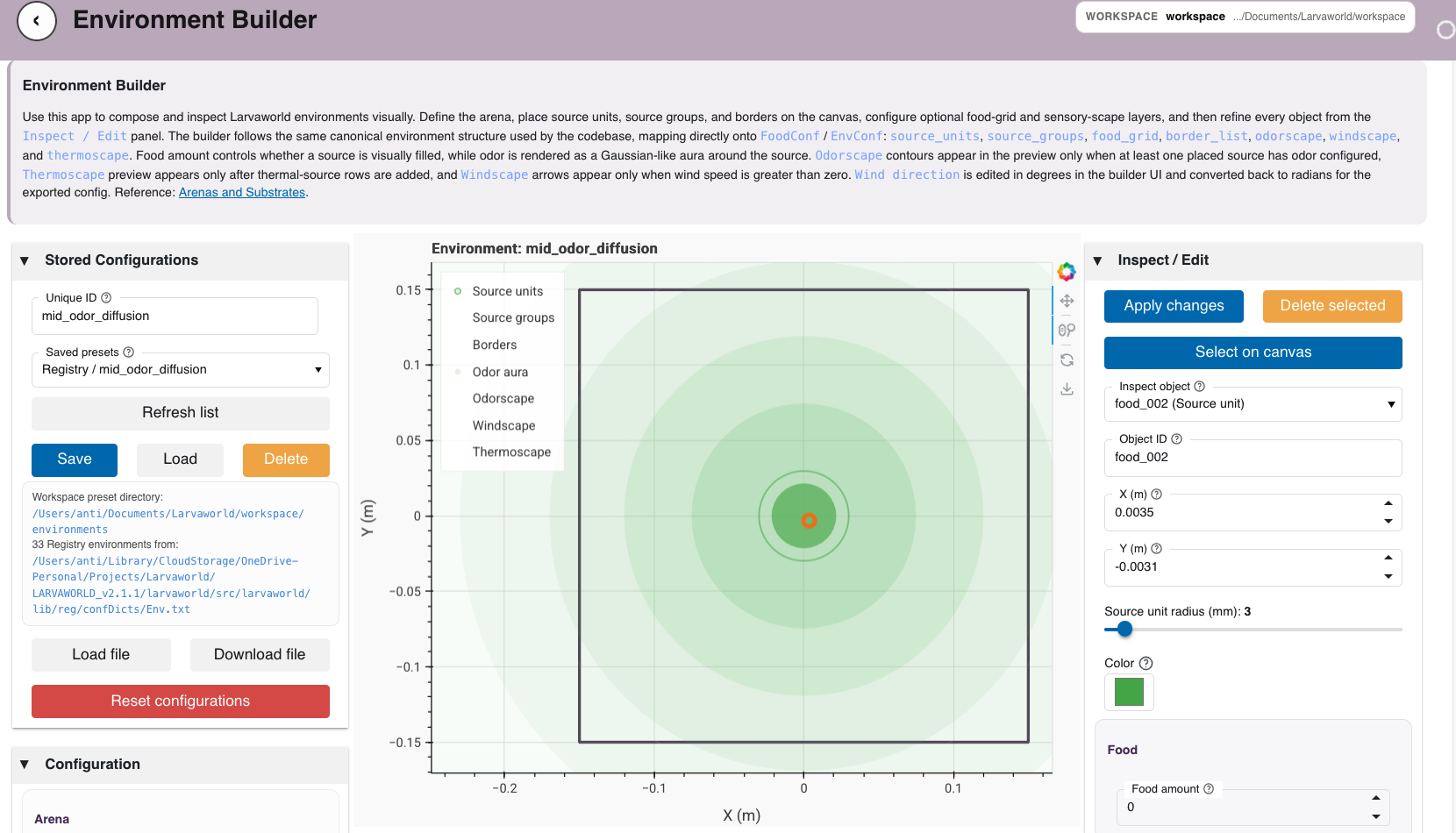
Figure: Larvaworld Portal Environment Builder with arena, food, border, and scape configuration controls.
Import Experimental Datasets
Purpose: Import one raw experimental dataset into workspace-owned storage.
Features:
Select a stored
LabFormatconfigurationInspect and edit tracker, filesystem, preprocessing, and environment settings
Choose or browse to a raw-data root
Discover candidate raw datasets from the selected source
Import one selected candidate through the central Larvaworld import backend
Save the imported dataset under the active workspace
Access: wf.open_dataset
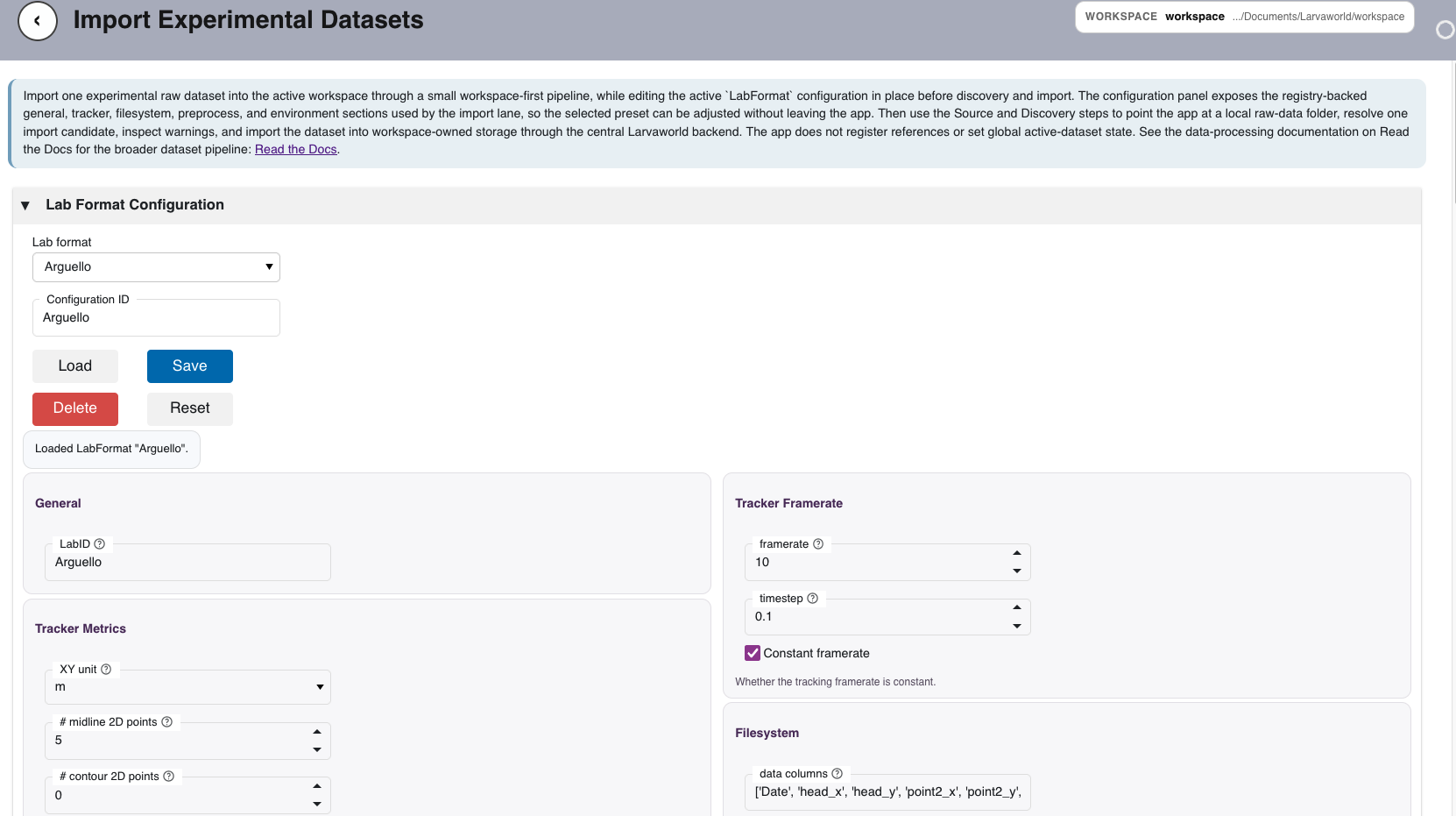
Figure: Import Experimental Datasets workflow with LabFormat
configuration, source selection, discovery, and workspace import controls.
Dataset Manager
Purpose: Browse and manage imported datasets stored in the active workspace.
Features:
List workspace-imported datasets as lightweight records
Search and filter the imported dataset catalog
Inspect dataset IDs, lab IDs, group IDs, reference IDs, and agent counts
View paths to the dataset directory,
conf.txt, anddata.h5Copy dataset paths and remove imported datasets from workspace storage
Access: wf.dataset_manager
Dataset Replay
Purpose: Replay larval trajectories frame by frame.
Features:
Inspect trajectory geometry and motion quality
Step through movement over time
Compare individuals within a dataset
Use the established Larvaworld replay dashboard from the portal
Access: track_viewer
Model Inspector
Purpose: Explore larva model presets and model parameters.
Features:
Browse available model configurations
Adjust locomotion-related parameters in the browser (changes are not saved to disk unless you use your own workflow to export them)
Review feeding, sensing, and memory-related settings together with locomotion in a clear layout
Run or pause a short live preview to see how the selected model behaves over time (default trace window: 500 steps; adjustable in the controls)
Pick live chart traces in a compact row (activity, then input, then phase); labels name the signal and show the short reporter keyword from the registry in parentheses
Compare two model presets side by side when you want a quick overview of differences
Separate areas for brain-related settings and for body and metabolism-related settings
Access: larva_models
Module Inspector
Purpose: Inspect standalone brain modules (one module and mode at a time) without loading a full larva model preset. It covers three module “kinds”, each with its own probe:
effector (
crawler,turner): driven by a constant scalar A_infeeder: a self-oscillator with no external input
sensor (
olfactor,toucher,windsensor,thermosensor): driven by a time-varying stimulus
Features:
Select a module (7 modules across the 3 kinds), then a mode. Modes requiring remote/IPC backends are excluded from this standalone view: Nengo modes everywhere and the olfactor osn mode (remote Brian2 server).
Edit module parameters with typed widgets that stay linked to the module while you adjust them.
Kind-aware drive:
effector: constant A_in slider (bounds follow the module input range when defined)
feeder: no input; the module runs on its own rhythm once started
sensor: a time-varying stimulus (sinusoid or step) with editable baseline, amplitude, frequency, and onset
Set N steps and dt for the time axis; the trace recomputes immediately on any control or parameter change.
Choose which signals to plot (Bokeh time series, x-axis in seconds):
effector: input, activation, phi, output (whichever exist on the instance)
feeder: phi, complete_iteration
sensor: stimulus, output
For wind, odor, and touch sensors, the app uses starting values so traces are visible without extra setup. For temperature and similar channels, a changing stimulus is used because these plots mainly show how the reading responds when the signal changes, not when it stays flat.
Deterministic preview defaults: initial phi is forced to 0 after construction; the neural turner warm-up remains stochastic (seed RNGs for repeatable tests).
Access: locomotory_modules
Legacy Dashboard Launcher
The larvaworld-app command serves the established dashboard collection
directly. These dashboards are also available through the portal routes where
they are part of the landing registry.
Dashboard |
App ID |
Purpose |
|---|---|---|
Experiment Viewer |
|
View experiment results interactively |
Track Viewer |
|
Inspect trajectories |
Model Inspector |
|
Explore locomotory models |
Module Inspector |
|
Inspect crawler/turner/feeder/sensor modules (portal) |
Lateral Oscillator |
|
Visualize the neural oscillator module |
Web App Architecture
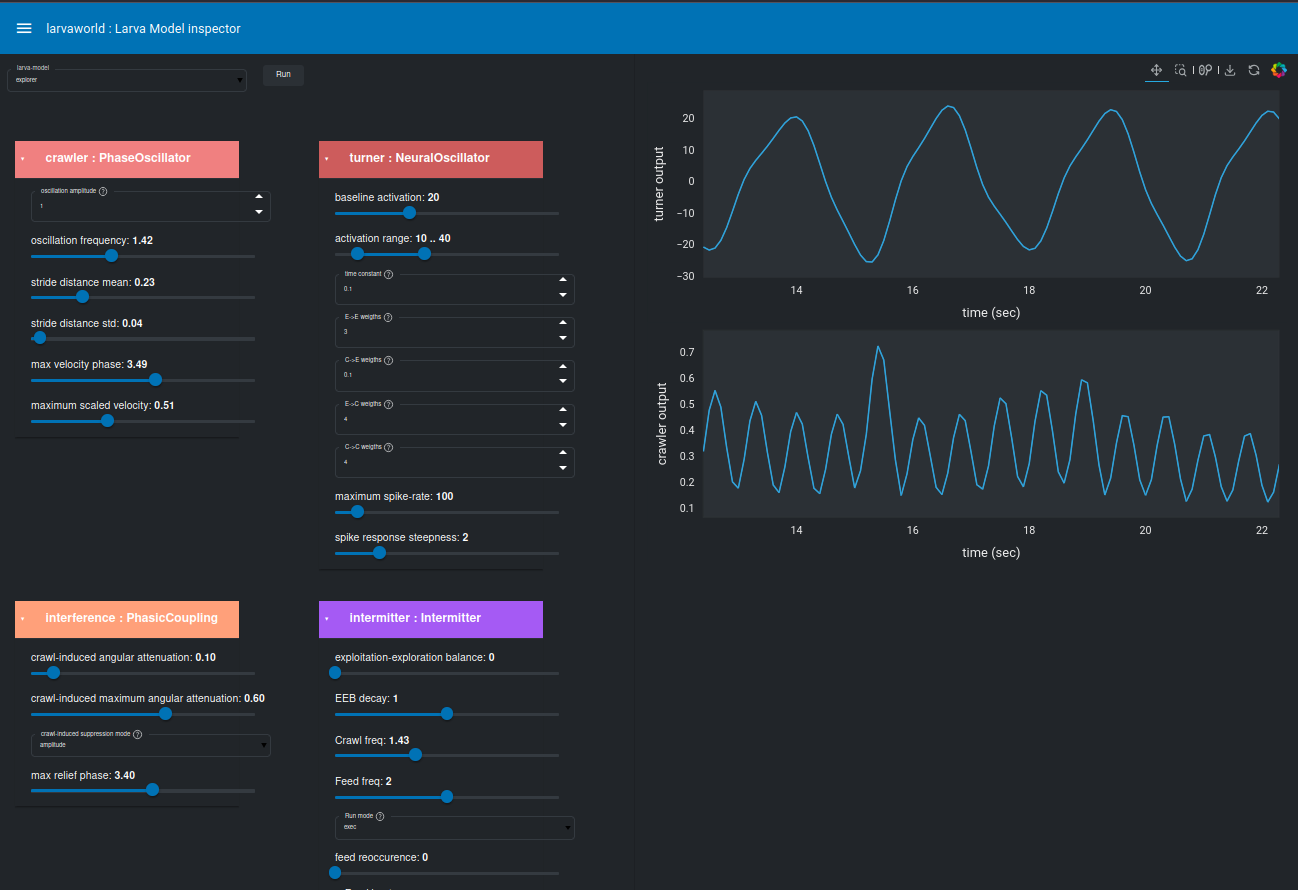
Figure: Larvaworld web application architecture showing interactive visualization and control panels.
The portal keeps the browser UI separated from core Larvaworld model, registry, and dataset functionality. App controllers orchestrate existing backend functions and configuration classes, while persistent workflow artifacts are written to the active workspace.
The main architecture layers are:
Portal server: maps route IDs to lazily loaded Panel app factories
Landing registry: defines application metadata, lanes, quick-start modes, documentation links, and notebook shortcuts
Workspace layer: stores portal-owned artifacts under the selected workspace
Dataset lane: discovers raw datasets, imports them into the workspace, and lists imported dataset records
Configuration widgets: expose reusable editors for Larvaworld
param.Parameterizedconfiguration classesLegacy dashboards: remain available for established replay, model, module, and oscillator inspection views