Simulation Modes
Larvaworld provides five distinct simulation modes, each designed for different research workflows. Understanding these modes enables you to choose the right tool for your specific question.
All modes share the same underlying agent-based architecture and configuration pipeline, but differ in how simulations are scheduled, how parameters are varied, and what kind of outputs they emphasize:
Exp – run a single experiment configuration (one condition, one output dataset/video).
Batch – launch many
Exp-like simulations over a grid of parameters or conditions (parameter sweeps, replicates).Ga – wrap simulations in an evolutionary loop to optimize model parameters against a fitness function.
Eval – compare one or more model configurations against reference datasets using standardized metrics.
Replay – visualize previously recorded experimental or simulated datasets without re-running the simulation.
Conceptually, these correspond to the simulation modes described in the Larvaworld paper [Sakagiannis et al., 2025]: starting from single-condition runs, through large-scale parameter exploration, to automated model fitting and evaluation against behavioral data.
Overview
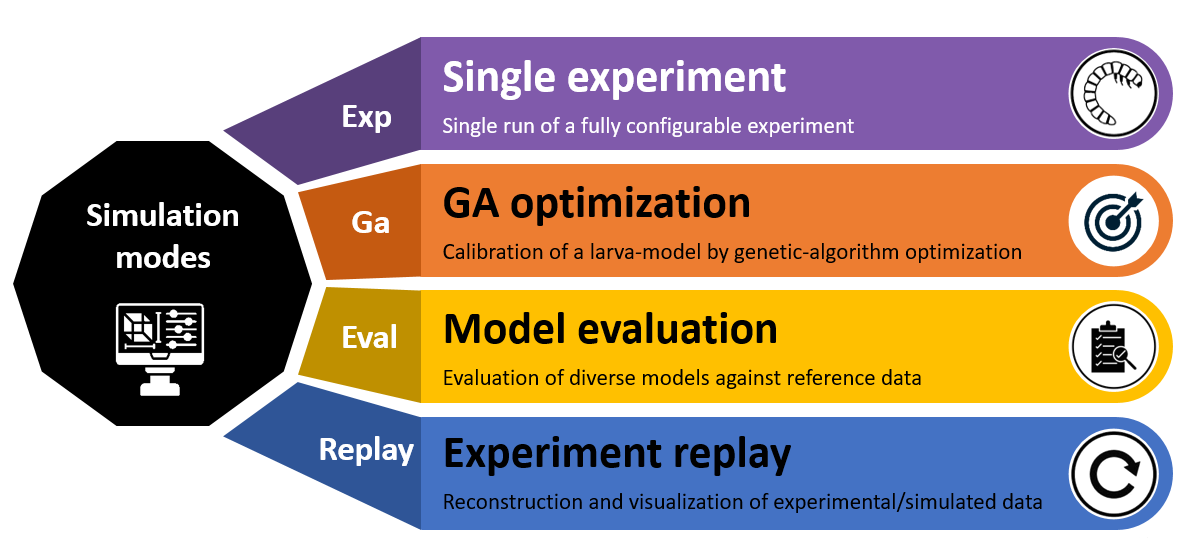
Figure: CLI simulation modes available in Larvaworld and their command-line arguments.
Mode Comparison
        graph TB
    subgraph "Single Experiment - Exp"
        E1[Single simulation<br/>One configuration]
        E2[One or multiple agents<br/>Fixed parameters]
        E3[Output: Dataset + Video]
    end

    subgraph "Batch Run - Batch"
        B1[Multiple simulations<br/>Parameter sweep]
        B2[Parallel execution<br/>Different conditions]
        B3[Output: Multiple datasets<br/>Comparative analysis]
    end

    subgraph "Genetic Algorithm - Ga"
        G1[Optimization loop<br/>Evolutionary search]
        G2[Population of genomes<br/>Fitness evaluation]
        G3[Output: Best genome<br/>Evolution history]
    end

    subgraph "Model Evaluation - Eval"
        V1[Compare models<br/>Against reference data]
        V2[Multiple model configs<br/>Fixed reference dataset]
        V3[Output: Statistical comparison<br/>KS test results]
    end

    subgraph "Dataset Replay - Replay"
        R1[Replay real data<br/>Visualization only]
        R2[Tracked trajectories<br/>From experiments]
        R3[Output: Video + Plots<br/>No simulation]
    end

    style E1 fill:#805aab,stroke:#5f497a,stroke-width:2px,color:#fff
    style B1 fill:#4caf50,stroke:#388e3c,stroke-width:2px,color:#000
    style G1 fill:#ed7d31,stroke:#b54d21,stroke-width:2px,color:#fff
    style V1 fill:#ffc000,stroke:#b38600,stroke-width:2px,color:#000
    style R1 fill:#4472c4,stroke:#2f5597,stroke-width:2px,color:#fff
1. Single Experiment (Exp)
Purpose
Run one simulation with fixed parameters for testing, exploration, or video generation.
Command-Line Usage
larvaworld Exp dish -N 5 -duration 3.0
Python Usage
from larvaworld.lib.sim import ExpRun

exp = ExpRun(experiment='chemotaxis', duration=5.0)
exp.simulate()
dataset = exp.datasets[0]
Characteristics
Configuration: One experiment ID (e.g.,
'chemotaxis','dish')Agents: N larvae with specified model
Parameters: Fixed throughout simulation
Execution: Sequential, single run
Duration: Seconds to minutes
Outputs
Dataset: Single
LarvaDatasetwith pose and brain dataVideo: Optional real-time rendering or export (MP4, AVI)
Plots: Analysis figures via
exp.analyze()Storage:
DATA/SimGroup/exp_runs/{experiment}/{id}/
Use Cases
✅ Quick testing of configurations
✅ Video generation for presentations
✅ Single condition analysis
✅ Model demonstration
2. Batch Run (Batch)
Warning
Status: Batch mode is currently under active development and may require debugging. Some features may not work as expected. For production use, we recommend using Exp mode for single simulations or Eval mode for model comparisons.
Purpose
Run multiple simulations with parameter variations to explore parameter space.
Command-Line Usage
larvaworld Batch PItest_off -N 10
Note
Configuration Note: The space_search parameter (which defines the parameter space to explore) is extracted from the predefined Batch configuration in sim_conf.py and should not be specified in the CLI command. Each Batch experiment ID has its own preconfigured space_search that defines which parameters to vary and their ranges.
Python Usage
Note
At the moment, BatchRun is under active development and the Python API may fail with:
TypeError: Constant parameter 'name' cannot be modified
Until BatchRun is stabilized, you can approximate a small parameter sweep by looping over ExpRun runs.
from larvaworld.lib.sim import ExpRun

# Temporary workaround: run a small set of single experiments (headless)
for run_id in range(3):
    run = ExpRun(experiment="PItest_off", N=10, duration=0.1, screen_kws={}, store_data=False)
    run.simulate()
Characteristics
Configuration: One experiment ID + parameter sweep
Agents: Multiple agent configurations
Parameters: Varied across runs
Parallelization: Uses
agentpy.Experimentfor multi-core executionIterations:
Nrepetitions per parameter combinationDuration: Hours
Outputs
Datasets: Multiple
LarvaDatasetobjects (one per run)Summary: Aggregated results across conditions
Comparison: Statistical analysis across parameter space
Storage:
DATA/SimGroup/batch_runs/{experiment}/
Use Cases
✅ Parameter sensitivity analysis
✅ Robustness testing
✅ Comparative studies
✅ Statistical power analysis
Note
BatchRun is an advanced feature that relies on preconfigured Batch entries in the registry (reg.conf.Batch). This feature is currently under active development and may require debugging. For most users, starting with Exp and Eval modes is recommended before moving to Batch-based parameter sweeps.
3. Genetic Algorithm (Ga)
Purpose
Optimize model parameters using evolutionary search to match target behaviors.
Command-Line Usage
larvaworld Ga exploration -Ngenerations 50 -duration 3
Python Usage
from larvaworld.lib.sim.genetic_algorithm import GAevaluation, optimize_mID

# Define evaluation against a reference dataset
evaluator = GAevaluation(
    refID="exploration.30controls",
    # Keep evaluation metrics aligned with what GAlauncher enriches by default.
    cycle_curve_metrics=[],
    eval_metrics={
        "angular kinematics": ["b", "fov"],
        "spatial displacement": ["v", "a"],
    },
)

# Run genetic algorithm to optimize locomotory model
results = optimize_mID(
    mID0="explorer",                      # Base model to optimize
    mID1="explorer_opt",                  # ID for optimized model
    ks=["crawler", "turner"],             # Module names to optimize
    evaluator=evaluator,
    Ngenerations=1,                       # Increase for real runs
    Nagents=10,                           # GA population size
    duration=0.05,                        # minutes per agent (increase for real runs)
    screen_kws={"show_display": False, "vis_mode": None},
    store_data=False,
)

best_conf = results["explorer_opt"]  # Optimized model configuration (AttrDict)
Characteristics
Configuration: Base experiment + parameter space to optimize
Genomes: Population of parameter sets
Fitness: Evaluated against reference data or target metrics
Evolution: Selection, crossover, mutation
Generations:
Ngenerationsiterations (e.g., 50)Duration: Hours to days
Outputs
Best Genome: Optimized parameter set
Evolution History: Fitness over generations
Final Population: All genomes with fitness scores
Plots: Fitness convergence, parameter evolution
Storage:
DATA/SimGroup/ga_runs/{experiment}/
Use Cases
✅ Model parameter fitting
✅ Behavior matching to real data
✅ Multi-objective optimization
✅ Sensitivity-guided parameter search
For detailed workflows, see Genetic Algorithm Optimization (Advanced).
4. Model Evaluation (Eval)
Purpose
Compare multiple models against experimental reference data using statistical tests.
Command-Line Usage
larvaworld Eval -refID exploration.30controls --modelIDs explorer navigator forager --analysis
Python Usage
from larvaworld.lib.sim import EvalRun

eval_run = EvalRun(
    refID='exploration.30controls',         # Reference dataset
    modelIDs=['explorer', 'navigator', 'forager'],  # Models to compare
    duration=0.5,                            # Short run for a quick demo
    N=20,                                    # Agents per model
    screen_kws={},                           # Headless
)
eval_run.simulate()
eval_run.plot_results()  # Statistical comparison plots
eval_run.plot_models()   # Model-specific visualizations

# Access results
print(eval_run.error_dicts['pooled']['end'])   # Endpoint metric errors
print(eval_run.error_dicts['pooled']['step'])  # Distribution metric errors
Characteristics
Configuration: Multiple model IDs + reference dataset
Models: Different behavioral configurations to compare
Reference: Real experimental data (
refID)Metrics: 40+ behavioral metrics evaluated
Statistical Tests: Kolmogorov-Smirnov (KS) tests
Duration: Hours
Outputs
Comparison Report: KS D-statistic per metric per model
Statistical Tests: p-values for each comparison
Plots: Box plots, trajectories, metric distributions
Rankings: Models ranked by overall fit
Storage:
DATA/SimGroup/eval_runs/{experiment}/
Use Cases
✅ Model validation
✅ Model selection
✅ Behavioral fingerprinting
✅ Hypothesis testing
For detailed workflows, see Model Evaluation.
5. Dataset Replay (Replay)
Purpose
Visualize real tracked data without running a simulation.
Command-Line Usage
larvaworld Replay -refID exploration.30controls -vis_mode video -save_video -video_file replay
Python Usage
from larvaworld.lib.sim import ReplayRun
from larvaworld.lib import reg

# Build replay parameters (trim time_range for a quick demo if desired)
params = reg.gen.Replay(refID="exploration.30controls", time_range=(0, 5)).nestedConf

replay = ReplayRun(
    parameters=params,
    screen_kws={
        "vis_mode": "video",
        "save_video": True,
        "video_file": "exploration_replay",
    }
)
replay.run()  # No simulation, just visualization
Characteristics
Configuration: Reference dataset ID
No Simulation: No agent stepping, no physics
Replay Only: Playback of recorded trajectories
Visualization: Real-time rendering or video export
Fast: No computational overhead
Duration: Seconds to minutes
Outputs
Video: Rendered trajectories (MP4, AVI)
Images: Snapshots at specific timepoints
Plots: Same analysis as simulation data
No HDF5: Uses existing reference dataset
Use Cases
✅ Visualizing experimental data
✅ Creating videos from tracked data
✅ Quality control of imported datasets
✅ Comparative visualization
For detailed workflows, see Dataset Replay.
Comparison Table
Feature |
Exp |
Batch |
Ga |
Eval |
Replay |
|---|---|---|---|---|---|
# Simulations |
1 |
N × M × N |
Ngenerations × Nagents |
Nmodels × Nruns |
0 (replay only) |
Parameter Variation |
Fixed |
Sweep |
Evolving |
Fixed per model |
N/A |
Parallel Execution |
No |
Yes |
Yes |
Yes |
N/A |
Optimization |
No |
No |
Yes |
No |
No |
Reference Data |
Optional |
Optional |
Required |
Required |
Required |
Statistical Tests |
No |
Optional |
Yes (fitness) |
Yes (KS tests) |
No |
Video Output |
Yes |
Optional |
Optional |
Optional |
Yes |
HDF5 Storage |
Yes |
Yes |
Yes |
Yes |
No (uses existing) |
Duration |
Minutes |
Hours |
Hours-Days |
Hours |
Seconds-Minutes |
Decision Guide
Do you need to run a simulation?
├─ No → Use **Replay** (visualize existing data)
└─ Yes
   ├─ Single configuration? → Use **Exp** (quick test/video)
   ├─ Parameter exploration? → Use **Batch** (sweep parameters)
   ├─ Find best parameters? → Use **Ga** (optimize)
   └─ Compare models? → Use **Eval** (validate against real data)
Performance Considerations
Mode |
CPU Usage |
Memory |
Disk I/O |
Time Complexity |
|---|---|---|---|---|
Exp |
Single core |
Low |
Low |
O(N_steps) |
Batch |
Multi-core |
Medium |
High |
O(N_sims × N_steps) |
Ga |
Multi-core |
Medium-High |
High |
O(N_gen × N_agents × N_steps) |
Eval |
Multi-core |
Medium |
Medium |
O(N_models × N_runs × N_steps) |
Replay |
Single core |
Low |
Low |
O(N_frames) |